Pages

Showing posts with label Router. Show all posts

Friday, 19 July 2013

D-Link launches new AC1750 802.11ac router

At an event in London yesterday, networking company D-Link showcased its range of 11ac routers for the consumer market. There are now five models covering several flavours of the 11ac standard, with single-stream (1x1, AC750), dual-stream (2x2, AC1200) and triple-stream (3x3, AC1750) products. All products have Gigabit Ethernet WAN connections apart from the AC1200 DSL-3580L ADSL model which will appear at a later date.

The DIR-810L (£62) is a single-stream AC750 model, aimed at the budget end of the market and lacking extras such as a USB port. The next model up is the AC1200 DIR-850L, which adds a USB port and uses a cylindrical design.

The DIR-860L has one of the first implementations of the 11ac beamforming technology, called Smartbeam by D-Link. Beamforming helps improve performance and reduce interference with neighbouring networks by phasing the antennas to give a directional signal pointing at the client. To get the full benefit it needs beamforming support in the client, though. The 860L also gains a USB port.

The newly-announced DIR-868L (£133) is an AC1750 product, with similar features to the 860L. Also shown at the launch was the miniature AC580 single-stream DWA-171 USB adapter, which joins the existing DWA-182 dual-stream adapter.

D-Link now has one of the most diverse 11ac offerings of any vendor, enabling it to hit multiple price points. I'm hoping to get samples of one or more of the models over the coming weeks, so keep an eye out for my reviews.


The DIR-868L is an AC1750 router with Smartbeam beamforming capability

Find it on Amazon:


Friday, 7 June 2013

WD My Net AC1300 router and My Net AC Bridge

Western Digital launched its first routers about a year ago, and now it's entered into the 802.11ac market with the My Net AC1300. It has also launched the My Net AC Bridge, which will be needed to get the best performance as few devices have 11ac capability yet.

It's by far the fastest 11ac router I've tested to date, achieving 170Mbps throughput at close range and 70Mbps at 25m. 11n performance was a bit patchy, though. It's not too expensive, however, at £135 for the router and £69 for the bridge. You can read my full news article over on ZDNet UK.

The WD AC1300 has a nice graphic menu system

At close range, performance is impressive

Even at 25m, throughput still topped 70Mbps

Design is compact but plain
The matching AC bridge has 4 Gigabit Ethernet ports


Friday, 19 April 2013

New Fritz!OS firmware launched for Fritz!Box

I noticed a few weeks ago that a new version of Fritz!OS5 had appeared on the German AVM site, and have been eagerly awaiting the International version. It appeared today (version 84.05.51), so I installed it on my Fritz!Box 7390 to give it a spin. I haven't had time to check out exactly what's new, but the look and feel is unchanged, with a few minor tweaks - such as links to Fritz!Box, Fritz!NAS and MyFritz at the top right of the interface.

One thing that has gone is the dreaded 'Green' LAN port power management feature that drove many users to distraction. There seem to be quite a lot of new features, and it's going to take me a while to sort through them. I have noticed that the FritzFON now has a built-in network media player, so you can stream music from any DLNA media server. Not world-shattering, but certainly novel.

There's also a new Smart Home section, apparently for the upcoming FritzDECT 200 home controller, which sounds quite interesting. You can also now assign user accounts for web access to the Fritz!NAS, and Google Contacts (and some other online services) can be imported to a new address book, which is very neat and works well. There's also a new FritzAPP, and (finally) a single sign-on for the MyFritz remote management service.

It looks like a very worthwhile release, and you can get it by going to the Firmware Update section of the System menu and clicking Find New Firmware. I hope to go into more detail later as I explore the new features.

The overview screen is largely unchanged


You can now import Google Contacts into an address book

Tuesday, 9 April 2013

Review: TP-Link TL-WDR3600 N600 dual-band router

Another bargain from TP-Link, for those who don't need 3-stream 11n capabilities

Router prices are dropping to crazy levels, typified by the measly £60 you need to get hold of the TP-Link TL-WDR3600. This is a dual-band, dual-stream (N600) cable model (it doesn’t have an ADSL modem), and although it offers little in the way of innovation it has plenty of decent features and adequate performance.


It's not pretty, but it works well

Dual USB2 ports distinguish this from the WDR3500


Hardware

The design is exactly the same as the pug-ugly TL-WDR4300  (click for my review), with a large, shiny black plastic case that - to my mind at least - just makes it look cheap and nasty. This feeling is reinforced by the 10 (yes, 10) blue status LEDs on the front. Blue LEDs have been so overdone in recent years that now they just look old-fashioned. In this case, it’s not helped by the fact that the LEDs are quite large and most of them blink constantly, which is incredibly distracting if the router’s in view. I do like status LEDs, but they need to be both discrete and clear - in the WDR3600 it’s hard to tell which is which from a distance, and they don’t change colour when there’s a problem, just blink differently.

It has two standard detachable dual-band external antennas. These look a bit ungainly, but many users still prefer them to the more fashionable internal micro-antennas. At the back are the standard four Gigabit Ethernet ports, plus a dedicated WAN port (also Gigabit Ethernet). Two USB2 ports (which differentiate this model from the single-ported WDR3500), a power switch and reset button complete the external hardware features.

Configuration

Styling aside, there’s plenty to like about the WDR3600. The setup wizard on the CD works well, and allows you to clone the MAC address if needed. There’s also a wizard in the web management menu, which can be opened using the http://tplinklogin.net shortcut (the default username and password are both ‘admin’).
The settings menu is the standard TP-Link 3-column text-based interface (there’s an emulator at http://www.tp-link.com/resources/simulator/TL-WDR3600/Index.htm if you want to take a look). There’s a growing trend to graphical interfaces, but I still prefer the speed and simplicity of text, as long as stuff is easy to find. In this case, it is, with a category menu down the left side, settings in the middle and contextual help at the right.

The USB ports support printers and storage, but not 3G dongles. User accounts can be created for volume-level access via Windows Explorer, but shared folders can only be created for FTP access.
There’s also a DLNA media server, although this can only share up to six separate folders on each storage device.

It uses the standard TP-Link menu layout

One unusual feature, also seen in the WDR4300, is the hardware NAT acceleration - this can be enabled or disabled in the NAT section of the settings. Personally, I think it’s a bit of a waste of time - all it does is improve WAN to LAN throughput to a quoted 800Mbps. This feature is really intended for enterprise use when connected to a Gigabit WAN, so that internet traffic can be sent at wire speed. For ordinary broadband, it’s not really necessary. Also, some readers of this blog have complained about the hardware NAT affecting VoIP in the WDR4300, although during a couple of weeks’ testing the WDR3600 I saw no problems (my SIP provider is Sipgate).

Access Control

The WDR3600 does have a few access control features, including parental controls and bandwidth control. They’re not the easiest for novices to set up, though, as they do need an understanding of protocols and ports. The parental controls can be used for white-/blacklisting IP addresses, domains or protocols and scheduling access times for any MAC address. Bandwidth control is fairly basic, allowing rules-based limiting of inbound or outbound traffic. There are no automated QoS settings.

Interior

The WDR3600 is powered by Atheros chips, with an AR9344 system-on-a-chip (SoC) providing the 2.4GHZ radio, plus a separate AR9582 2x2 chip for 5GHz operation. An AR8327 chip provides the Gigabit Ethernet switching. This hardware is very similar to that found in its big brother, the TL-WDR4300, with the exception of the 5GHz radio - the WDR4300 uses a 3x3 AR9582 chip.


Performance

The WDR3600 is configured by default for auto channel width settings on both bands. As usual, I tested using the defaults. My test environment (my home) is surrounded by several neighbouring 2.4GHz networks (but no 5GHz networks yet), making it a good place to see real world performance.

As usual, I used the Advanced Networking Tests section in Passmark Performance Test 8 (I do also run Totusoft’s LAN Speed Test for a quick sanity check). The standard client adapter I use is a 3-stream (450Mbps) Intel Ultimate N Wifi Link 5300AGN adapter retrofitted to an Acer Aspire One netbook.
At close range (1m) on the 2.4GHZ band the WDR3600 did very well compared to some routers I’ve seen recently, managing 50Mbps average throughput. It didn’t do so well at 25m, though, with a very unreliable connection averaging around 5Mbps.

At 5GHz the close range performance was actually slightly less than the 2.4GHz results at 48Mbps, which is quite unusual. However, at 25m it was much better at 18Mbps - this is still a fairly average result, however.


1m/2.4GHz

1m/5GHz

25m/2.4GHz

25m/5GHz

Conclusion

Although its performance results are not particularly noteworthy, considering the price they’re perfectly acceptable. Oddly, the numbers are slightly better than those I measured in the more expensive TL-WDR4300.

It does have an almost identical set of features to the WDR4300, though, and given that the WDR3600 is around £15-£20 cheaper, I’d definitely recommend it, especially for those who don’t have any 3-stream 11n clients.

Price: around £60

Contact details
Phone: +44 (0) 845 147 0017


Find it on Amazon:

Wednesday, 13 March 2013

Review: Belkin AC1200DB 11ac router

My full review of Belkin's first two-stream (867Mbps) 11ac router, the AC1200DB, has just been published on Computeractive's website (although I actually wrote the review some time ago). It is a decent router, but has no particularly outstanding features. Its street price has come down quite a bit since I looked at it, which does make it a bit more attractive, as it's now one of the cheapest 11ac models available. I think I'd probably opt for it over the similarly-priced D-Link DIR-865L, purely on the basis that the D-Link didn't work well with my SIP phone service (a problem with the SIP ALG, I think - disabling that fixed it).

The AC1200DB's 11ac performance was excellent (I tested it using Linksys and Netgear client bridges), and not far off the three-stream devices I've seen, but 11n performance was very average in my usual noisy domestic test environment (I'm getting used to this - it seems that since the Wi-Fi Alliance enforced 'good neighbour' policies on vendors, 11n performance has plateaued). At the time of testing, Belkin had no matching USB client adapter, but that's now been rectified and I hope to review a sample here in the near future.

Over 160Mbps at close range

Still managed over 40Mbps at 25m

It includes free Norton Contentsafe parental controls, which are all-or-nothing  controls that affect all PCs


Odd choice of wording in the setup wizard!

It can only be used standing up, there's no wall-mount capability

The new Belkin logo features prominently

Find it on Amazon:

Saturday, 9 March 2013

Review - Netgear R6300 11ac router

Computeractive has just published my full review of the Netgear R300 11ac router. I've mentioned this briefly in my previous post about the 11ac roundup for ZDNet, but there's a bit more detail in this review. It is a very impressive router, despite its size, with plenty to keep advanced users happy. It's also one of the fastest models I've tested in 11ac mode. Its price has dropped quite a bit since it launched, and is now selling for around £170.

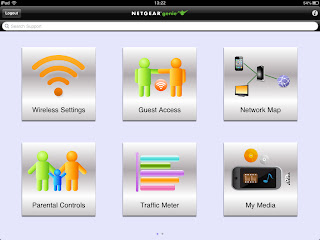
The Netgear Genie app in particular deserves praise - it makes managing the router much less of a chore. It also has a neat trick of turning any attached USB printer into an Airprint-compatible printer, allowing it to be used wirelessly from an iOS device.

Performance in 11ac mode at 25m was outstanding - over 100Mbps

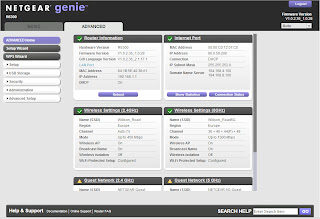
The Netgear Genie desktop app is great

Plenty of advanced options in the settings menu

It's very bulky

This is the iOS Genie app

Find it on Amazon:


Wednesday, 20 February 2013

802.11ac router roundup

Here's a link to an article I wrote for ZDNet recently, looking at three of the latest 11ac routers from Cisco (Linksys EA6500), D-Link (DIR-865L) and Netgear (R6300). They all have their strengths and weaknesses, but if pushed I would plump for the Netgear R6330 purely for the fact that its performance is outstanding. It's a bit big and bulky, though.

The Cisco Linksys EA6500 is not a bad performer, and the matching WUMC710 media bridge adapter is by far the best of the bunch in terms of design and performance, and although it's expensive it does have a 4-port Gigabit switch. I still don't like the router's Cisco Cloud Connect interface, though.

D-Link's DIR-865L is one of the cheapest 11ac routers around, and it shows. It is very ungainly, and the DWA-182 USB client adapter is quite large, but cheap. When I was testing it, it played havoc with my SIP telephones, probably because of an incompatibility with the SIP ALG.

Netgear also has a matching 11ac USB adapter, the A6200, which has a peculiar rotating antenna that makes it a bit of a space-hog in a notebook.

Netgear R6300

D-Link DIR-865L

Cisco Linksys EA6500

Find it on Amazon:

Thursday, 31 January 2013

AVM to launch 1,300Mbps Fritzbox at CeBIT

Yes, it's that time of year again when my inbox overfloweth with CeBIT press releases (I've only just managed to clear out the CES ones..). One that caught my eye was from AVM, makers of the Fritzbox routers. In it the company says it will be demonstrating several new products, including routers with 200Mbps DSL capabilities (thanks to 'vectoring and bonding', apparently).

But what's more interesting (to me at least) is that it will be launching a 1,300Mbps 802.11ac Fritzbox model - the attached image shows the German prototype. The company also says it will be announcing new mobile apps.

CeBIT runs from 5th-9th March, 2013. If you're planning on going, AVM will be in hall 13, stand 48. I imagine we won't see shipping products here in the UK until well into the summer.

UPDATE 15/3/2013: The new top-of-the-range model (pictured) was named as the Fritz!Box 7490. 

Well, it certainly looks like a Fritzbox


Tuesday, 18 December 2012

Review: D-Link DIR-505 Mobile Cloud Companion

This is a low-priced all-in-one travel router with some excellent features. It can operate as a router/access point, wireless repeater or as a wireless hotspot for sharing a public Wifi connection. The mode is selected via a 3-position hardware switch. I've seen a couple of similar devices, but this is the neatest by far and is very easy to use as well as being amazingly cheap. The range in repeater mode isn't brilliant, but its versatility makes up for it. You can read my full review on Computeractive's website.


Find it on Amazon:

Thursday, 15 November 2012

AVM Fritz!Box 3370

AVM has launched quite a few new models this year, trying to please everyone with assorted combinations of features. The latest 3370 model drops all the VoIP and telephony features has VoIP support for AVM's free FritzApp FON, with the full range of VoIP settings found in other models, but dispenses completely with analogue phone ports and DECT. The FritzApp FON can be used over Wifi or LAN on iOS and Android smartphones and tablets. [Thanks to reader Philippe for the tip - the VoIP features are hidden unless you tick a box for FritzApp support on the WLAN settings page].

The 3370 is AVM's first 3-stream (450Mbps) 11n model. It only has a single radio, though, so can only work on one frequency at once. At around £150, it's quite expensive for what you get, but Fritz!Box aficionados are quite used to that.

Performance is pretty mundane (see graphs below), although better than the previous 2-stream models at long distance. You can read more on my post for ZDNet UK's First Take blog.

No, it's not my house

The inside is pretty bare now the hardware telephony stuff has gone. There are 3 antennas - one is at the bottom right, soldered vertically to the motherboard. the other two are under the usual 'fins' at the top.

2.4GHz @ 1m

2.4GHz @ 25m

5GHz @ 1m

5GHz @ 25m

Find it on Amazon:

Friday, 9 November 2012

Review: Zyxel NBG-419N V2 router

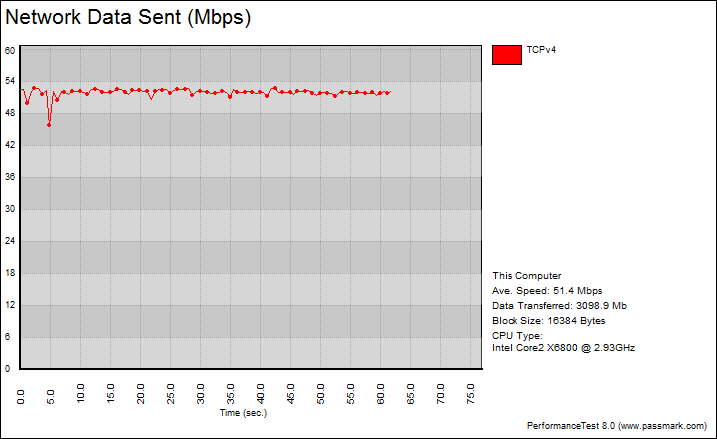
This ultra-cheap (£38) router from Zyxel is full of surprises, not least that it includes a USB port for file and printer sharing, an easy-to-use graphical interface and some basic QoS and bandwidth management features. There are lots of other advanced settings tucked away in the 'expert' menu, too. Its performance wasn't too shabby either, with around 17Mbps real throughput at 25m in my standard test setup.

It's a dual-stream (2x2) 11n model with external antennas, designed for cable/BT Infinity use (there's no modem version). You can read my full review over on Computeractive.
No scale here, but it's tiny

The USB sharing app

Bandwidth management is rare at this price level

The Easy Mode is very easy

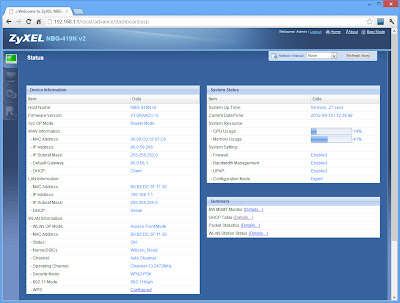
Plenty of advanced settings for tinkerers

Throughput at 25m was pretty decent for a budget router


Find the best price on Amazon:


Thursday, 6 September 2012

Tested: TP-Link TL-WDR4300 N750 Gigabit router

A 3-stream router that may not be pretty, but is very affordable

Consumer router design seems to have evolved into two competing camps: sleek and elegant, and in-your-face. The TP-Link TL-WDR4300 is firmly in the latter category, with its three huge detachable antennas, glossy black casing and multiple bright blue status LEDs. I personally don't like this kind of styling, but I'm more interested in what's inside and how it performs.

Subtle, it ain't

Dual USB ports are unusual at this price point

It ticks most of the boxes for ports, with four switched Gigabit LAN ports and a Gigabit WAN port (there's no ADSL version). There are two USB ports, each with a status LED (not sure why, as they're tucked out of sight). As with most routers destined for Europe these days, there's a physical power toggle button. There's also a sliding switch to turn the dual-band, dual-radio 11n Wifi off, plus a tiny reset/WPS button tucked between an antenna and a LAN port. This is very difficult to access if the port is occupied and you have large fingers.

The casing itself is very wide and feels a bit cheap, with rather sharp corners on the glossy black plastic. I like discreet status lights, but the blue LEDs are anything but. There are 10 of them, including one peculiar 'system ' light that flashes when there's nothing wrong, and turns off when there's a problem - what kind of problem is not mentioned in the manual, but it seems a little pointless.

As I have to set the MAC address of any router I test (I still use an old Virgin Media cable modem), it is always a good test of how clever the setup procedure is - to date I have only seen one router, the D-Link DIR-857, that recognised the problem and asked whether I wanted to change the MAC address. TP-Link's setup assistant (run from either the CD or the web GUI) is very easy to use, and surprisingly did offer to clone the PC's MAC address if you select the Dynamic IP WAN connection type. You can also enter the MAC address manually, which is what I had to do. It's a nice touch, although not many users have this problem these days.

The setup assistant is simple but works well

Wireless settings and security can also be configured in the wizard - the TL-WDR4300 allows concurrent dual-band or single-band operation on the 2.4GHz or 5GHz bands. The setup CD also lets you install the USB printer sharing utility, which is simple and works well. It also supports scanners.

USB printers and scanners can be shared

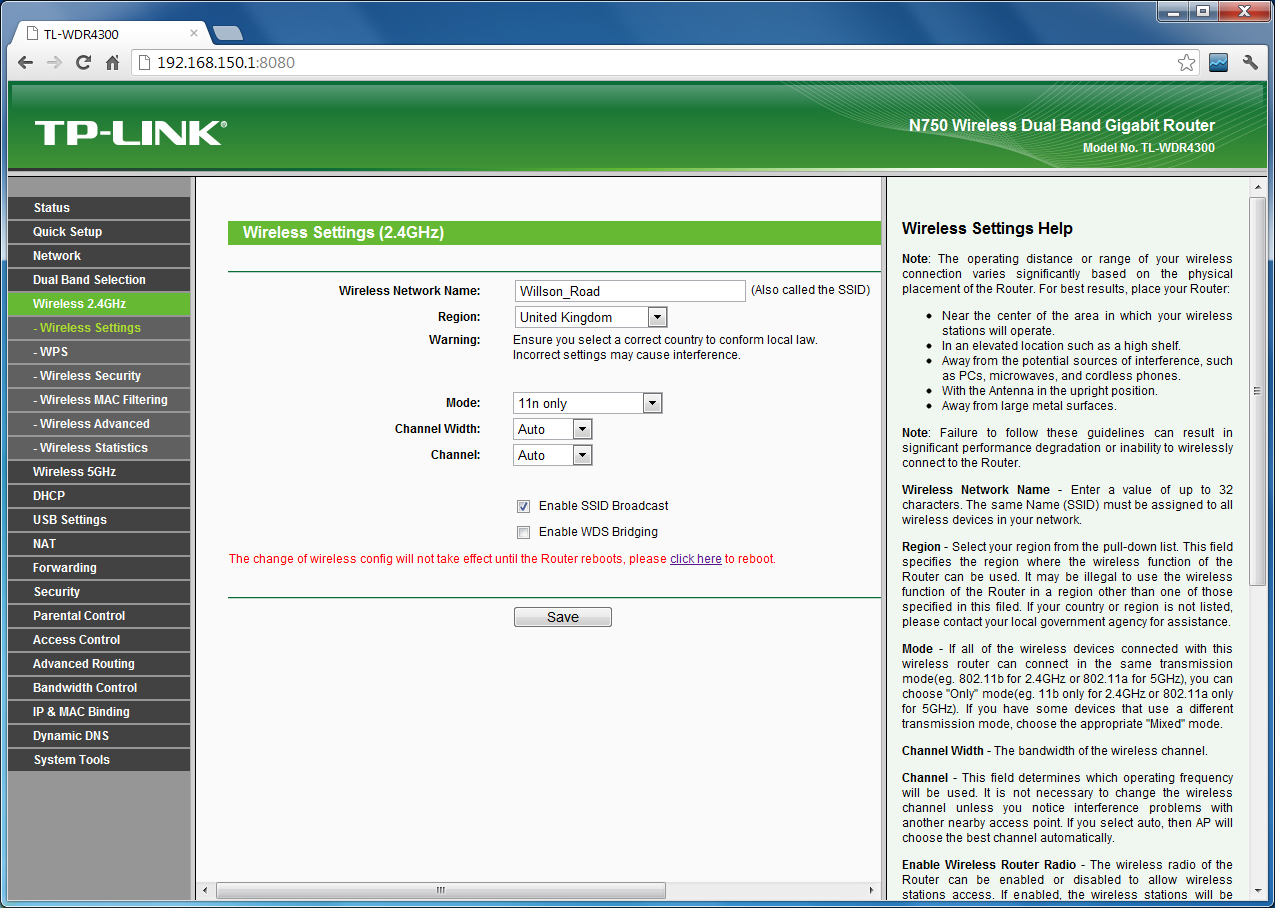
The router's web interface has the standard TP-Link text-based UI layout, which is fairly clear and easy to use. The handy help column on the right is generally well written and very useful. Unlike some routers, it doesn't insist on a reboot after every change, but can defer changes made on different pages.


The USB ports can also be used for NAS storage, and there's a DLNA media server included. User-level access to shared folders can be enabled, or you can just leave it open to all. The USB ports can't be used for 3G dongles, though.

Advanced features are a mixed bag. Although there is brute bandwidth control for specified IP addresses or ports, there are no proper QoS settings. There are MAC-based parental controls, although these are limited to a whitelist of domains or keywords, and are a bit messy to configure. The Access Control feature allows rules-based traffic blocking, but less technical users would greet this with blank stares.

Opening the router revealed that it is using an Atheros AR9344 2-stream radio for the 2.4GHz band, and an Atheros AR9580 3-stream chip for 5GHz. There's also an Atheros AR8327N chip powering the Gigabit switch.


And so to the performance. Using my standard setup of an Acer Aspire One netbook with a 3-stream Intel 5300AGN aadapter, and running Passmark Performance Test 7, at close range it could only manage about 40Mbps on the 2.4GHz band, rising slightly to 44Mbps at 5Hz. At 25m it returned a very disappointing 5Mbps at 2.4GHz, although the 5GHz performance was a bit better (although very variable) at about 11Mbps. The graphs below show one run from each test (I run the tests three times and take the average).

2.4GHz, 1m

2.4GHz, 25m


5GHz, 1m

5GHz, 25m

As a sanity check, I usually repeat the tests using my trusty old Fritz WLAN USB stick, which is a 2-stream device but often outperforms the Intel adapter. In this case, though, it was almost identical, although it did give much better 2.4GHz results at 1m (up to 54Mbps), and the 5GHz performance at 25m was much more stable at around 14Mbps.

Note that my test environment (my home) is plagued with lots of neighbouring 2.4GHz wireless networks of various strengths, so 2.4GHz performance can be affected. However, there are (so far) no other 5GHz networks in the area.

My review sample did have the first firmware release, so perhaps there is room for TP-Link to tweak it a bit in future releases, but as reviewed it is a disappointing showing. Of course, at around £75, the TL-WDR4300 is one of the cheapest 3-stream models around, so I wasn't expecting miracles, and for those wanting to move up to 3-stream 5GHz wireless to minimise interference from neighbours it's a reasonable entry-level model with decent features. The nearest rival I've seen personally is Belkin's N750DB, which had slightly better performance but also costs a bit more.

So there you have it. If you like your routers brash and black, the TL-WDR4300 might appeal, and although it's not the fastest on the planet, it's very easy to setup and configure, has some useful features such as a media server and dual USB ports, and perhaps more importantly, has a bargain price tag.

Contact details
Web: TP-Link TL-WDR4300 N750 Wireless Dual Band Gigabit Router
Phone: +44 (0) 845 147 0017

Update 27/12/12: As you can see from the comments below, a few people have been having trouble with VoIP when the hardware NAT feature is enabled. Hardware NAT acceleration is one of those weird features that is really a bit pointless for most users (it uses a special chip to offload the NAT duties, theoretically improving LAN to WAN performance), and I'd suggest disabling it if you use VoIP. You will still have NAT protection if it's turned off, but it will be done in software using the router's CPU as it is with almost every other router.


Find it on Amazon: