
Monday, 30 January 2012
Review: Intuit QuickBooks SimpleStart 2012
Accounts software is an almost necessary evil for those of us who are self-employed, and Intuit's new SimpleStart version of QuickBooks 2012 is a desktop product aimed at very small businesses. It's not bad at all, and tries to help non-financially aware business owners (that is, most of us) with keeping an eye on cashflow and tax reports. It has a one-off purchase price rather than the subscription model of more capable versions. Read my full review on Computeractive.


Wednesday, 25 January 2012
Review: QNAP TurboNAS TS-219P-II
QNAP's NAS enclosures might not be particularly cheap, but they have plenty of features. This two-bay model has hot-swap drive bays, a 2Ghz Marvell CPU, 512MB of RAM and lots of Qpkg add-ons to keep advanced users happy. You can read my full reviews on Computeractive and ITProPortal (the new name for IT Reviews)
Also below are the performance results using Passmark's Advanced Disk Test (Computeractive doesn't publish these for bare enclosures). I used my standard setup of three identical 250GB Hitachi CinemaStar drives in a RAID-0 configuration. As you can see, it's no sluggard.
Find it on Amazon:
Also below are the performance results using Passmark's Advanced Disk Test (Computeractive doesn't publish these for bare enclosures). I used my standard setup of three identical 250GB Hitachi CinemaStar drives in a RAID-0 configuration. As you can see, it's no sluggard.
 |
| It features two quick-release hot-swap drive bays |
 |
| These are Passmark's overall Disk Test results |
 |
| Database workload (90% read/10% write, 10% sequential/90% random) |
 |
| File Server workload (80% read/20% write, 100% random) |
 |
| Web Server workload (100% read, 100% random) |
 |
| Workstation workload (70% read/30% write, 20% sequential/80% random) |
Find it on Amazon:
Tuesday, 17 January 2012
Review: TP-Link WR2543ND 450Mbps router
TP-Link has finally launched its first 3x3 MIMO 450Mbps router, after announcing a model at the 2011 CES that never actually saw the light of day. It's a budget single-radio dual-band model, with Gigabit LAN ports, and has plenty of good features for the price (around £70), although it's not particularly stylish and you will need a suitable adapter for your PC/notebook in order to connect at 450Mbps (I added one of these to my Acer Aspire netbook at the beginning of 2011). You can read my full reviews over at IT Reviews and Computeractive. (But note that IT Reviews has attributed the review to the wrong author - I've asked for it to be corrected).


Find it on Amazon:
Wednesday, 4 January 2012
Review: Zyxel WAP3205 access point/repeater
This is a very handy and affordable piece of kit if you're struggling to get good 2.4GHz Wifi coverage around a home or office. It can work as either a standard access point, wireless bridge or a universal repeater. I found the initial setup a bit confusing (it comes with DHCP disabled) but once you work out what it can do (it can also be a WDS repeater) it's not bad for something costing around £50, although it's only a single-band device. I've done a full review for IT Reviews.
Find it on Amazon:
 |
| The WAP3205 can act as am 2.4GHz 11n access point, wireless bridge or universal repeater |
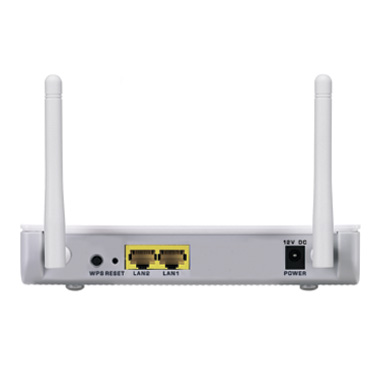 |
| Two LAN ports are provided |
 |
| There's an EZ-1223 wizard for quick setup |
Find it on Amazon:
Sunday, 1 January 2012
Cyberpower DX800E GreenPower UPS
I was recently commissioned to write an article on surge
protection and uninterruptible power supplies (UPS) for Computeractive, which
gave me a great excuse to finally buy myself a UPS. I used to own an ancient Belkin
model that died a couple of years ago (almost taking my PC with it), and have
never got around to replacing it.
The confusion arises because some PC PSUs using active power factor correction (Active PFC) can trigger an overload condition on some UPS models when they turn on - APC has an explanation in its knowledge base. All PSUs sold in Europe have had to use PFC for many years, but most use passive PFC, which is a little more tolerant of stepped waveforms. If your PC has an Active PFC PSU, it should be fine, but if it generates overload trips, or turns off when the UPS transitions to battery power, this could be the reason.
Eventually I decided on a Cyberpower GreenPower DX800E standby UPS from Ebuyer, as it was on special offer (£67 including VAT) and matched my needs. It has three AC outlets (two standard UK 13-amp sockets and one IEC socket) and is remarkably small, measuring 235 x 90 x 190mm - I don’t have a lot of room under my desk so this is a real benefit. There’s just one on/off button, three status lights and a charge level indicator on the top.
After charging it for the recommended eight hours, I plugged it in and everything worked fine. Unplugging the mains kicked the inverter into action as it should. The UPS comes with Cyberpower’s nifty PowerPanel software monitoring tool (the UPS is connected via USB, with a cable included in the box), and I tried this on the desktop PC. For Windows 7 users there’s also a desktop gadget that shows several parameters - input voltage, estimated standby time and so on.
I have two main work PCs - my Windows desktop and my
self-built Windows Home Server. I also have a media PC, but as all its data is
stored on the WHS box, it doesn’t really need a UPS. Using my Maplin plug-in power meter, I found
that the desktop (which has a 2.93GHz Pentium Core 2 Extreme X6800 CPU) averages out at
around 120W in use, and the WHS box (with a 3.4GHZ Pentium 4 Extreme Edition)
rarely moves above 80W.
I also wanted to protect my Acer X223HQ 22in monitor, which
uses about 60W maximum, giving a total of 260W. Doubling this to give some
extra running time on battery meant I needed a UPS with a rating of about 800VA
(using the rule-of-thumb of multiplying the VA figure by 0.6 to get Watts).
I had to brush up my fading memory about the different types
of UPS, and I got sidetracked for a while reading about ‘pure sine-wave’ line
interactive models. This is pretty much a red herring for the average domestic
user - the ‘stepped approximation to a sine wave’ (or ‘simulated sine wave’) output
used in most low-cost standby (off-line) models is perfectly fine for the vast majority of users. My PCs both
use modern, good-quality Active PFC PSUs from BeQuiet, and they weren’t fussed by
my eventual choice of a model with a stepped output.
The confusion arises because some PC PSUs using active power factor correction (Active PFC) can trigger an overload condition on some UPS models when they turn on - APC has an explanation in its knowledge base. All PSUs sold in Europe have had to use PFC for many years, but most use passive PFC, which is a little more tolerant of stepped waveforms. If your PC has an Active PFC PSU, it should be fine, but if it generates overload trips, or turns off when the UPS transitions to battery power, this could be the reason.
Eventually I decided on a Cyberpower GreenPower DX800E standby UPS from Ebuyer, as it was on special offer (£67 including VAT) and matched my needs. It has three AC outlets (two standard UK 13-amp sockets and one IEC socket) and is remarkably small, measuring 235 x 90 x 190mm - I don’t have a lot of room under my desk so this is a real benefit. There’s just one on/off button, three status lights and a charge level indicator on the top.
 |
| The DX800E is very compact |
After charging it for the recommended eight hours, I plugged it in and everything worked fine. Unplugging the mains kicked the inverter into action as it should. The UPS comes with Cyberpower’s nifty PowerPanel software monitoring tool (the UPS is connected via USB, with a cable included in the box), and I tried this on the desktop PC. For Windows 7 users there’s also a desktop gadget that shows several parameters - input voltage, estimated standby time and so on.
 |
| The PowerPanel software is very good |
 |
| There's also a desktop gadget for Windows 7 users |
However, I wanted to connect the USB cable to my WHS box as
this runs 18 hours a day without a monitor, keyboard or mouse and so is awkward
to shut down in a hurry. I use the excellent free Grid Junction WHS add-in,
which recognised the UPS with no problem. This shuts down the system automatically
when the battery drops below 80% charge (which is after about 2-3 minutes with
all devices plugged in). I will rely on shutting the desktop PC down manually -
when I’m not using it it’s always in hybrid sleep mode anyway, so a loss of
power won’t affect it.
 |
| The Grid Junction WHS add-in ensures a graceful shutdown when the power fails |
I’m very happy so far with this bargain UPS, although a minor niggle is that it doesn’t
come with an IEC C20 power cable. The battery is supposed to be replaceable,
but Cyberpower doesn’t sell these and just says that it uses a ‘universal’ 8.5AH
battery. I haven't taken it apart yet, but I reckon it’s unlikely to be cost effective to replace - if I get a couple of years' use out of it I'll be more than happy.
Find it on Amazon:
Find it on Amazon:
Subscribe to:
Posts (Atom)